



1. Introduction to Selenium Webdriver
Selenium Webdriver is an open-source, cross-platform automation framework that empowers developers and testers to automate web-based applications efficiently. It provides a robust interface to interact with web browsers programmatically, mimicking human interactions like clicking buttons, filling forms, and navigating through web pages. It is a powerful tool for automating web testing. It allows you to write scripts that interact with web applications, making it an essential tool for software quality assurance. In the ever-evolving landscape of web development, ensuring the functionality, reliability, and compatibility of web applications across different browsers and platforms is of paramount importance. This is where Selenium Webdriver steps in as a potent and indispensable tool for web automation and testing.The Significance of Selenium Webdriver
Selenium Webdriver has emerged as the de facto standard for web application testing, and for good reason:1. Versatility: Selenium supports multiple programming languages such as Java, Python, C#, and more. This versatility allows testers and developers to choose the language they are most comfortable with.
2. Cross-Browser Compatibility: It enables testing across various web browsers like Chrome, Firefox, Safari, and Edge. This ensures that your web application functions seamlessly regardless of the browser your users prefer.
3. Platform Agnostic: Selenium Webdriver can be deployed on Windows, macOS, or Linux, making it a platform-agnostic choice for automation.
4. Open Source: Being open source, Selenium is cost-effective and benefits from a thriving community of developers who continuously enhance and extend its capabilities.
5. Extensibility: Selenium’s modular design allows the incorporation of various plugins and frameworks, adapting it to specific project requirements.
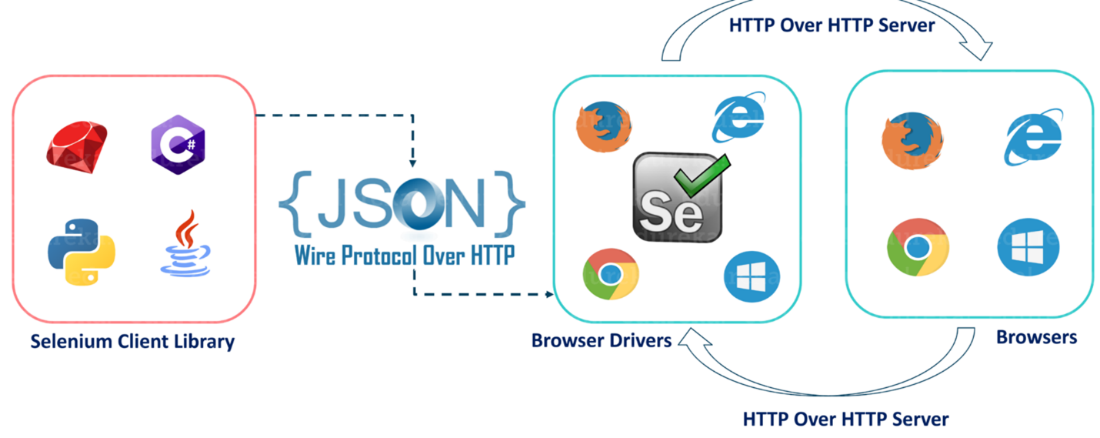
Selenium Webdriver Architecture- After you trigger the Test, the complete Selenium code (Client) that we have written will be converted to JSON format.
- Generated JSON is sent to the Browser Driver (Server) through the http Protocol.
- Browser drivers communicate with their respective browser and executes the commands by interpreting Json which It receives on the browser.
- Browser Driver receives responses back from the browser and it sends JSON response back to Client.
Why Automation with Selenium Webdriver Matters
- Efficiency: Automation with Selenium speeds up repetitive tasks, reducing manual testing efforts and enabling more frequent and thorough testing.
- Accuracy: Selenium performs tests precisely as defined, eliminating human errors in test execution.
- Regression Testing: It facilitates automated regression testing, ensuring that new code changes do not introduce unintended side effects.
- Continuous Integration: Selenium integrates seamlessly with CI/CD pipelines, allowing for automated testing of new code commits.
- Parallel Testing: Selenium Grid, an integral part of Selenium, enables parallel testing on multiple browsers and platforms, further accelerating test execution.
- Comprehensive Testing: Selenium Webdriver can handle complex testing scenarios, including handling pop-ups, validating data, and interacting with elements such as checkboxes, radio buttons, and dropdowns.
2. Setting Up Selenium Webdriver
To get started, you need to install Selenium Webdriver and set up your development environment. Follow these steps:
- Download and install Java Development Kit (JDK).
- Download the Selenium Webdriver library.
- Configure your IDE (e.g., Eclipse or IntelliJ) for Selenium.
- Set up WebDriver drivers for browsers (e.g., Chrome, Firefox).
3. Writing Your First Selenium Script
Let’s dive into practicality:
- Create a new Selenium project in your IDE.
- Write a simple script to open a web page and interact with elements.
- Execute and debug your script.
- Explore the Selenium API for more advanced actions.
4. Selenium Webdriver Best Practices
Ensure your automation project’s success with these best practices:
- Use proper project structure and naming conventions.
- Maintain clear and concise code.
- Implement error handling and reporting.
- Regularly update your WebDriver drivers.
- Use version control for scripts.
5. Locating and Interacting with Web Elements
Learn how to locate and interact with web elements:
- Identify elements using various locators (ID, XPath, CSS, etc.).
- Perform actions like clicking, typing, and verifying element states.
- Handle dynamic elements and waits effectively.
6. Advanced Techniques with Selenium Webdriver
Take your automation to the next level:
- Handle pop-ups, alerts, and iframes.
- Implement data-driven testing.
- Capture screenshots and handle file uploads.
- Perform headless testing for faster execution.
7. Selenium Webdriver with Java
Explore the Java-Selenium integration:
- Set up a Java project for Selenium.
- Utilize Java features for better script management.
- Leverage Java libraries for test reporting and logging.
8. Cross-Browser Testing with Selenium
Ensure compatibility across browsers:
- Configure Selenium for cross-browser testing.
- Write scripts that work seamlessly on different browsers.
- Handle browser-specific issues effectively.
9. Selenium Grid for Parallel Testing
Optimize test execution with Selenium Grid:
- Set up a Selenium Grid for parallel testing.
- Distribute tests across multiple nodes.
- Monitor and manage test execution efficiently.
10. Debugging Selenium Tests
Troubleshoot and debug your automation scripts:
- Use debugging tools in your IDE.
- Analyze log files and error messages.
- Implement debugging techniques for complex scenarios.
11. Selenium vs. Other Test Automation Tools
Compare Selenium to alternative automation tools:
- Evaluate the pros and cons of Selenium.
- Consider other tools like Appium, Cypress, and Puppeteer.
- Make an informed choice based on your project requirements.
12. Conclusion
In conclusion, Selenium Webdriver is a versatile and essential tool for automating web testing. With the knowledge gained from this guide, you can create robust automation scripts, ensure the quality of your web applications, and streamline your testing process..