


What is Microsoft PowerApps? In today’s fast-paced business landscape, the ability to swiftly adapt and innovate is a defining factor for success. As organizations seek to streamline processes, improve efficiency, and enhance customer experiences, the role of technology becomes increasingly pivotal. This is where Microsoft Power Apps steps onto the stage, empowering both developers and non-developers alike to create powerful, customized business applications without the need for extensive coding knowledge. Microsoft Power Apps is a suite of tools and services designed to enable the creation of custom applications that address specific business needs. With Power Apps, you can create apps that run on various platforms, including the web, mobile devices, and even within Microsoft Teams. The platform allows users to build apps with minimal coding, using a visual interface that leverages drag-and-drop components and pre-built templates.
Key Features and Benefits:
- No-Code/Low-Code Development: One of the standout features of Power Apps is its no-code/low-code approach. This means that even individuals without extensive coding experience can design, develop, and deploy applications. This democratization of app development reduces the dependency on dedicated development teams and accelerates the delivery of solutions.
- Rapid Development: Power Apps dramatically reduces development time by providing a library of pre-built templates and components. This allows organizations to quickly build functional prototypes and iterate on them based on user feedback.
- Integration with Microsoft 365 and Azure: Power Apps seamlessly integrates with other Microsoft services, such as Microsoft 365 and Azure. This enables the creation of apps that pull data from various sources like SharePoint, Excel, and Dynamics 365, facilitating a cohesive and connected ecosystem.
- Responsive Design: Power Apps automatically adapts to different screen sizes and orientations. This responsiveness ensures that the apps you create function effectively across a range of devices, from desktops to smartphones.
- AI and Data Analysis: The platform includes AI Builder, which enables users to integrate artificial intelligence capabilities into their apps. This can range from optical character recognition (OCR) to sentiment analysis, adding a new dimension of functionality to the applications.
- Security and Compliance: Power Apps maintains the high-security standards that Microsoft is known for. Organizations can control data access, implement encryption, and adhere to compliance regulations seamlessly.
- Custom Workflows: Power Apps allows users to design custom workflows that automate business processes. For instance, you can create an app to streamline the approval process for purchase orders or automate lead nurturing in a sales pipeline.
Use Cases:
The versatility of Microsoft Power Apps makes it applicable to a wide array of use cases across different industries:
- Expense Tracking: Create an app that enables employees to submit and track their expenses, automating the approval process and ensuring accurate record-keeping.
- Inventory Management: Develop an app that allows warehouse staff to manage inventory levels, scan barcodes, and update stock status in real time.
- Customer Relationship Management (CRM): Build a customized CRM app that centralizes customer data, interactions, and sales leads, helping sales teams manage their pipelines more effectively.
- Field Service Management: Design an app that dispatches service requests to field technicians, providing them with all the necessary information and tools to complete tasks efficiently.
- Training and Onboarding: Create an app to streamline employee on boarding by providing access to training materials, forms, and resources in a single, accessible platform.
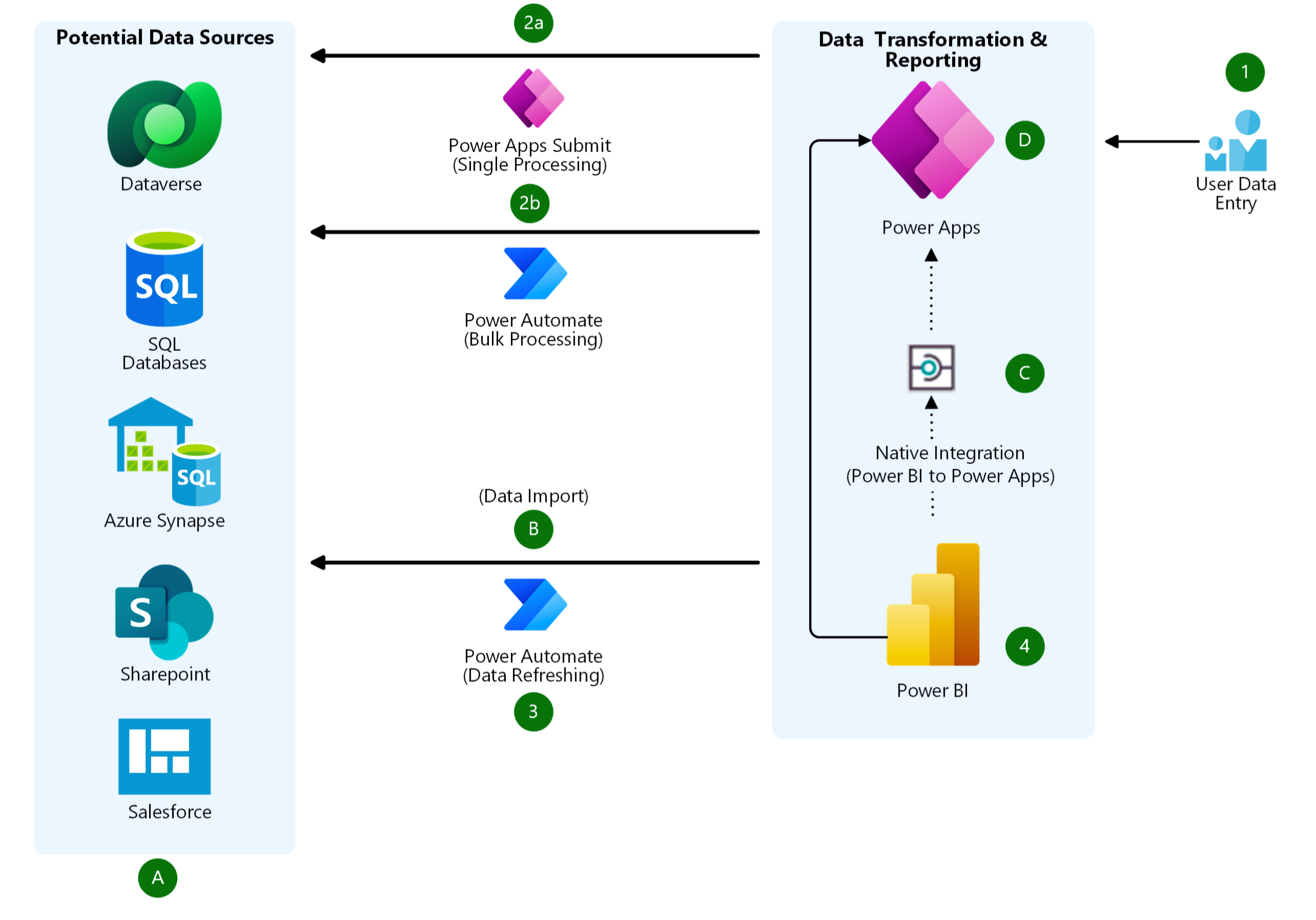
In the image given below, have a look at the architecture of Microsoft PowerApps:
Creating apps in Power Apps: Power Apps is a high-productivity development platform for business apps, and has four major components:
- Canvas apps
- Model-driven apps
- Cards
- Microsoft Dataverse
Canvas apps: Design and build a business app from a canvas in Microsoft Power Apps without writing code in a traditional programming language such as C#. Design the app by dragging and dropping elements onto a canvas, just as you would design a slide in PowerPoint. Canvas apps start with your user experience, crafting a highly tailored interface with the power of a blank canvas and connecting it to your choice of more than 200 data sources. You can build canvas apps for web, mobile, and tablet applications. Canvas apps give you the flexibility to arrange the user experience and interface the way you want it. Creating a canvas app is easy. With Power Apps, you can find or create your app in several ways:
- From data
- From a sample
- From a Dataverse source
- From a blank canvas
- From SharePoint
Model-driven apps: Model-driven app design is an approach that focuses on adding components such as forms, views, and charts and dashboards to tables using an app designer tool. Additionally, relationships connect tables together in a way that permits navigation between them and ensures that data is not repeated unnecessarily. Using the app designer with little or no code, you can build apps that are simple or complex. When you create a model-driven app, you can use all the power of the Dataverse to rapidly configure your forms, business rules, and process flows. Cards: Cards (preview) are micro-apps with lightweight UI elements that can be used across multiple applications that does not require any coding or IT expertise. You can instantly design and develop cards that can surface business data through Power Platform connectors or use your own business logic for more customization. Because they are part of the Power Apps ecosystem, cards can add business logic through Power Fx and integration with business data through Power Platform connectors. Microsoft Dataverse: Microsoft Dataverse is the data platform that comes with Power Apps and allows you to store and model business data. It is the platform on which Dynamics 365 apps (such as Dynamics 365 Sales, Customer Service, Field Service, Marketing, and Project Service Automation) are built. If you are a Dynamics 365 customer, your data is already in Dataverse. Dataverse allows you to securely store and manage data within a set of standard and custom tables, and you can add columns to those tables when you need them.
Conclusion:
Microsoft Power Apps empowers individuals and organizations to innovate and address business challenges through custom applications, without the need for extensive coding expertise. Its no-code/low-code approach, integration with Microsoft services, and versatility make it a valuable tool for businesses looking to streamline processes, enhance customer experiences, and drive efficiency. As the digital landscape continues to evolve, Power Apps provides a bridge between ideas and solutions, enabling businesses to stay agile and competitive in an ever-changing world.