


Shielded Sign-in
What is MFA?
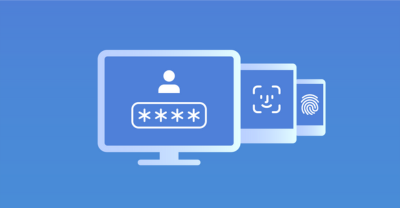
Multi-factor authentication is a security approach for account protection, ensuring that access to accounts and applications is granted only to authorized users. This is accomplished by mandating the provision of at least two factors to authenticate and confirm their identity. In conventional security practices, user accounts typically rely on a single authentication factor, usually a password known only to the user. However, to elevate security measures, the implementation of Multi-Factor Authentication (MFA) introduces an additional layer of protection. In this approach, users are not only required to provide something they know, such as a password, but they must also present an additional factor. This second factor could be something they possess, like a one-time passcode sent to their smartphone, or something intrinsic to their identity, such as a biometric scan. By incorporating multiple factors, MFA significantly strengthens the authentication process, making unauthorized access more challenging and fortifying the overall security of user accounts and applications.
How Does it Work?
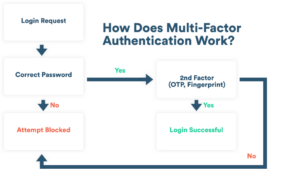
When you log into an account, like for email or a website, you usually type in your username and password. After that, the system wants to be extra sure it’s really you. So, it might ask you to prove it in a few ways. For example, they could send you a special password to your phone, which you use just this one time (that’s called a one-time password or OTP). Or you might use a special app on your phone that asks for your fingerprint or face scan (that’s your unique features, like your thumbprint or your face).
For some big companies, they might give you a physical thing, like a special key or a card, and you use that to show it’s really you. It’s like having a secret code or a special item to make sure only you can get into your account, keeping it safe from others who shouldn’t be there.
Imagine logging into your email or a website. First, you put in your username and password, which is like your digital key. But then, the system wants to double-check that it’s truly you. So, they might ask for more proof. For instance, they could send a unique password to your phone that you only use once (they call it a one-time password or OTP). Another way is using a special app on your phone that wants your fingerprint or a scan of your face – those are like your personal features, such as your thumbprint or how your face looks.
Now, think about big companies; they might give you a physical thing, like a special key or a card. You use that to show, “Hey, it’s really me!” It’s like having a secret code or a special item to make sure only you can get into your account. This keeps your account safe from anyone who shouldn’t be messing with your stuff.
Adaptive authentication: Adaptive authentication, a sophisticated implementation of MFA, streamlines the user authentication process intelligently. Each login triggers the adaptive authentication system to evaluate various contextual factors, such as location, device, time, and network connection, conducting a risk assessment on the login request. By comparing these factors to typical account login patterns, the system determines the level of risk associated with the attempt. If the login is deemed safe, the user can access their account using just one authentication factor. Conversely, if the attempt is considered unsafe, additional identity verification steps are required to ensure account security. For instance, logging into your Salesforce account from your regular work device is recognized as safe, while a cybercriminal trying to access it from a compromised iPhone in a foreign location triggers additional verification due to potential risk. The advantage of adaptive authentication is that most everyday users can access their corporate accounts without the need for multiple authentication methods each time, maintaining the same level of account security even in the presence of risky login attempts.
What characteristics should you seek in a multi-factor authentication solution?
Secure, Flexible Authentication: Optimal authentication solutions should endorse adaptive authentication and single sign-on, balancing easy access for legitimate users with robust account security. They should support a diverse range of authentication methods, including SMS passcodes, OTPs, biometrics, and, if necessary, physical tokens, ensuring accessibility for all users, including those without smartphones.
Cloud-based, Easy User Provisioning: The most effective solutions will be cloud-based, eliminating the need for hardware or on-premises setup. This reduces costs and simplifies system setup and administration. The ideal solutions should facilitate user onboarding through features like Active Directory sync and user self-enrolment, streamlining the setup process.
Easy Integrations: Seamless integration with existing accounts and applications is essential for a multi-factor authentication solution. API-based integration enables the enforcement of MFA and single sign-on across accounts with minimal effort. Top solutions typically support a wide array of applications, with more advanced options accommodating on-premises and custom-built applications. During the evaluation process, carefully review the documentation for integration capabilities.
Admin Dashboard: Premium solutions should offer a comprehensive admin dashboard for managing user authentication policies, reviewing login attempts, and logging security incidents. This dashboard should also facilitate straightforward user deprovisioning, preventing departed employees from accessing sensitive accounts.
Free Trial: The best solutions usually provide a free trial, allowing organizations to assess the service across a representative user sample. This trial period enables evaluation and ensures alignment with the broader security goals of the organization.
Multi-factor authentication (MFA) is like adding extra locks to your online accounts. Normally, you just need a password to get in, but MFA makes it tougher for bad guys. Instead of just using a password, you also need to show something else, like a special code sent to your phone. This way, even if someone figures out your password, they still can’t get in without the extra proof. It’s like having a secret handshake and a special key to make sure only you can access your stuff, keeping your accounts safer from sneaky attempts to get in. More and more businesses are using MFA to keep things safe. According to Gartner, a group that studies technology trends, by 2023, about 60% of big companies worldwide and 80% of smaller ones will use MFA to protect their accounts. It’s like adding an extra layer of security to make sure only the right people can access important stuff in a company. Our work accounts have important stuff in them, like secret company info or personal details. To keep them safe from bad people, lots of companies are using special systems called identity management platforms. These systems make sure there’s an extra layer of security, like needing more than just a password, when we use our work apps. It’s like having a super-secure lock on our important company stuff to keep it safe from sneaky hackers.